
Writing styles
Define tone, voice, length, and audience profiles per category. One blog can sound like a tech editor; another like a friendly how-to guide.
What is a style profile?
A style profile bundles a name + tone description + audience + length target + optional sample paragraph. Every article generated under that profile inherits these constraints. They live in MrNiche Autoblogger Pro → Styles.
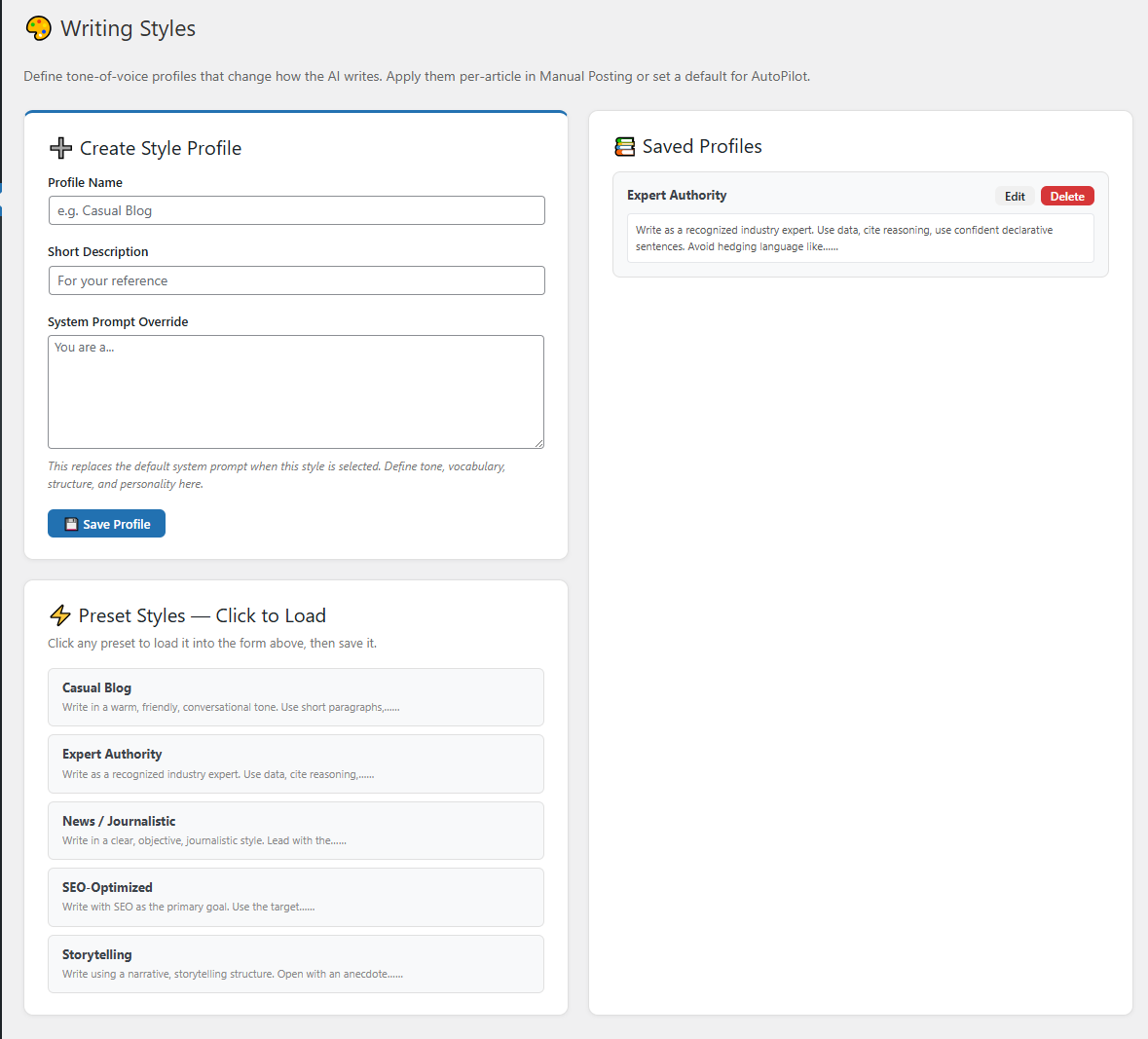
Anatomy of a profile
- Name — internal label (e.g. “Tech editorial”, “Friendly how-to”)
- Tone — 1–2 sentences (e.g. “Authoritative but approachable. Like a senior engineer explaining to a junior.”)
- Audience — who’s reading (e.g. “WordPress site owners with intermediate technical knowledge”)
- Length target — word count window (e.g. 1,800–2,400)
- Sample paragraph (optional but powerful) — paste 1–2 paragraphs of writing you want GPT to mimic
Common style templates
“Tech editorial”
Tone: Authoritative, slightly opinionated. Treats the reader as smart. Includes concrete numbers and examples. Mild dry humor allowed.
Audience: Developers and technical product people.
Length: 1,800–2,400 words.
“Friendly how-to”
Tone: Warm, encouraging. Acknowledges this stuff is confusing. Lots of “you” and “we”, short sentences, occasional asides.
Audience: WordPress beginners.
Length: 1,200–1,800 words.
“Recipe blog”
Tone: Personal, story-led intro then methodical instructions. Specific times, temps, quantities. Optimistic.
Audience: Home cooks of mixed skill levels.
Length: 1,000–1,500 words.
Knowledge Anchors New in v5.11
Each style profile has an optional Knowledge Anchors field. It solves a specific problem: MrNiche Autoblogger asks the model to “be specific” in every article (named tools, real numbers, concrete examples) and forbids it from fabricating statistics, study citations, or named people. Without a source pool, the model either invents numbers anyway or stays generic. Anchors close that gap.
Paste real, verified facts about your business, products, or topic into the field — numbers, dates, prices, named features, customer counts, real quotes. When an article needs a specific, the AI draws from this list verbatim instead of fabricating one.
Examples — anchors for a SaaS product
- 7-day free trial on all plans, cancel anytime, no charge
- Single plan: 1 site, $49.99/year (all updates and support included)
- Triple plan: 3 sites, $99.99/year (most popular tier)
- Unlimited plan: lifetime updates, never renew
- Background queue runs every 2 minutes via WP-Cron — no PHP timeouts
- Articles average 1,400–3,000 words with the multi-pass writer enabled
Examples — anchors for a recipe blog
- Sourdough proof times: 4–6 hours bulk at 75°F, 12–18 hours cold retard
- House bread flour: King Arthur, 12.7% protein
- Standard Dutch oven: Lodge 5.5-quart, preheats at 500°F for 45 minutes
- We've tested 60+ rye variations since starting the blog in 2022
- Always weigh flour in grams — volume cups are off by ±15%
Format and length
- One fact per line, or short paragraphs — both work. The model picks what’s relevant per article.
- Aim for under ~3,000 characters (~750 tokens) to leave room for article content.
- Anchors travel with the style profile, not the article. Multiple businesses or content niches → separate styles, each with its own anchors.
- Leave empty if you don’t have facts to share. Articles still generate — just without cite-able specifics.
What anchors do NOT do
- They do not force every fact into every article — the model only cites what’s topically relevant.
- They do not bypass the no-fabrication rule. The model is instructed not to extrapolate, modify, or round your facts.
- They do not change article length, structure, or tone — those are still controlled by your style prompt and Article Prompt.
Assigning styles to categories
In AutoPilot → Source categories, each category has a Style profile dropdown. Pick your profile, save. AutoPilot uses it for all articles generated under that category. Manual generation also lets you pick a style per-article from the same dropdown.
The humanizer pass
Every article goes through a humanizer pass after the main expansion — a second GPT call that rewrites for natural rhythm, variable sentence length, and removes the giveaway “AI tells” (overuse of “delve”, “tapestry”, em-dashes). Toggle in SEO Settings → Generation → Humanizer. Adds ~30% to generation cost, but the readability difference is large.
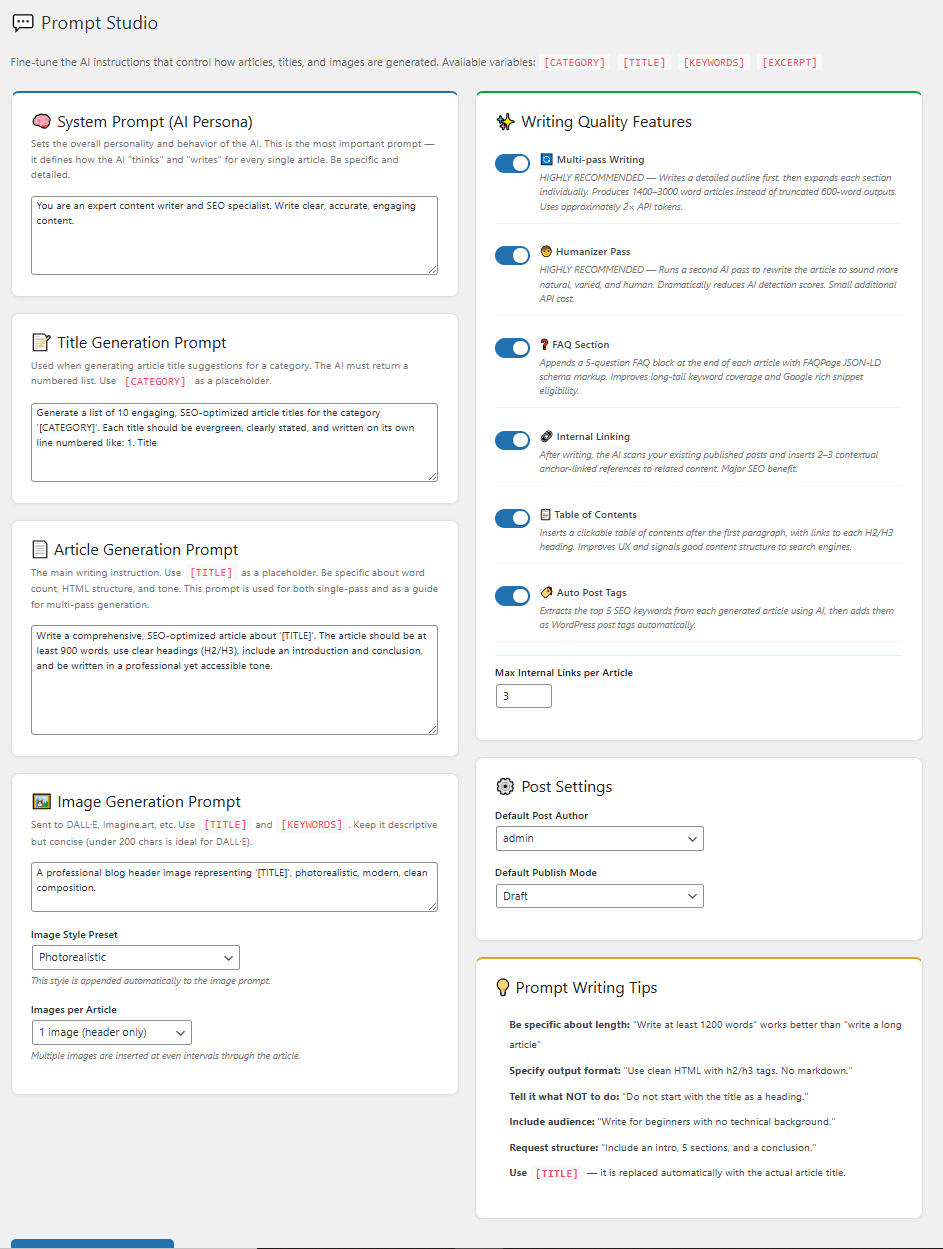
Output Language (beta)
Set Prompt Studio → Post Settings → Output Language and articles, titles, FAQ sections, and keywords are all written in that language — type any language name. Leave it empty for English. Heads-up for the beta: the built-in anti-AI-tell scrubbers are tuned for English, so non-English articles rely on the prompt-side humanization rules with lighter post-processing.
The Humanity Report
Every generated article gets a quality snapshot — 🟢 Strong / 🟡 Good / 🟠 Review — visible in the Generation Queue (hover for the numbers) and in the Logs. It measures the signals AI detectors care about: sentence-rhythm variance, AI-tell phrase count, em-dash usage, and heading-pattern uniformity. Use it as your review triage: skim the 🟢s, read the 🟠s before publishing.
Next steps
Style not coming through?
Share a profile + sample article — we’ll show you what to tighten.