
SEO integration
Yoast and Rank Math native integration, JSON-LD schema, internal linking, and per-article overrides.
SEO plugin compatibility
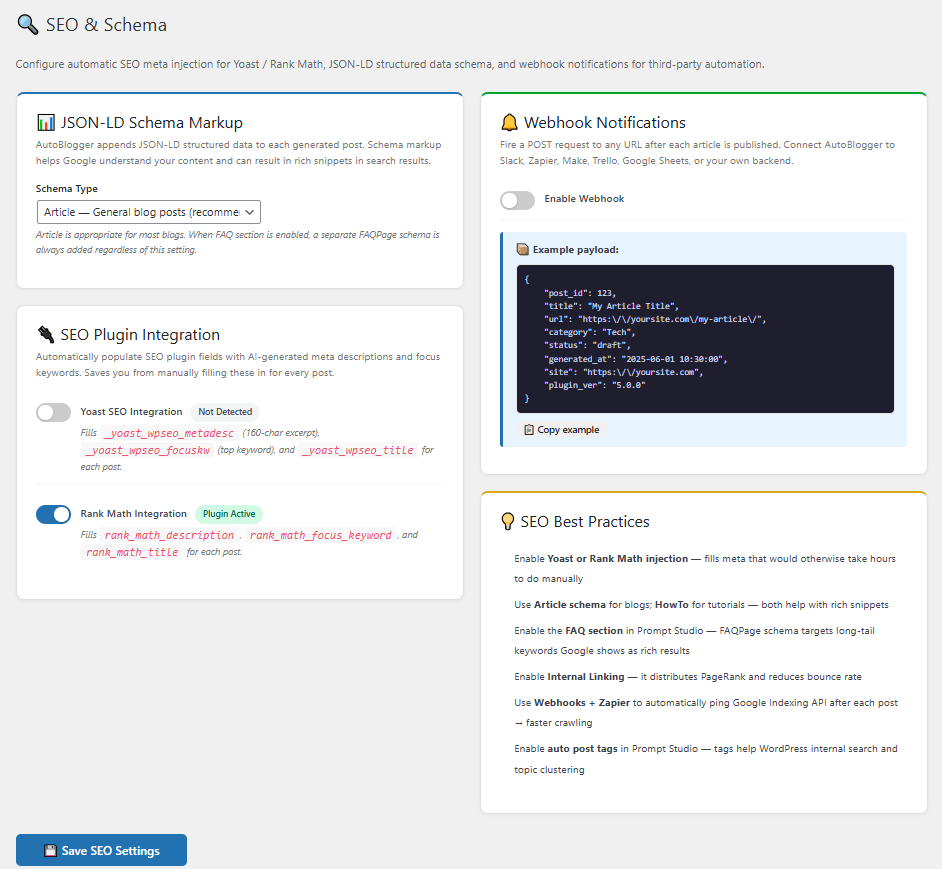
MrNiche Autoblogger detects whichever SEO plugin is active and writes the right meta fields:
- Yoast SEO — writes
_yoast_wpseo_metadesc,_yoast_wpseo_focuskw,_yoast_wpseo_title - Rank Math — writes
rank_math_description,rank_math_focus_keyword,rank_math_title - AIOSEO / SEOPress / others — falls back to standard
_aioseo_description+ native excerpt
Nothing to configure — install your SEO plugin, MrNiche Autoblogger handles the rest. Disable specific integrations in MrNiche Autoblogger Pro → SEO Settings if you want.
Focus keyword extraction
For every article, MrNiche Autoblogger asks GPT to extract the primary focus keyword based on the title and content. That keyword is written to whichever SEO plugin you have active. Override the prompt in SEO Settings → Focus keyword prompt if you want a specific style (e.g. always long-tail, always question-form).
JSON-LD schema (Article + FAQPage)
Every generated article emits two JSON-LD schemas in <head>:
- Article schema — headline, image, datePublished, author, publisher
- FAQPage schema — emitted when the FAQ section is enabled (toggle in SEO Settings)
Schema is stored in post meta _oaib_schemas and emitted via wp_head on singular pages — NOT inside post content (that approach gets stripped by content filtering and was a v5.0.0 bug we fixed). Validate any post at Google’s Rich Results Test.
Internal linking
Enable in SEO Settings → Internal linking. After each article is generated, MrNiche Autoblogger scans your existing posts in the same category, finds 2–4 contextually relevant ones, and inserts inline links into the body. Helps with site authority distribution and reader retention.
Table of contents (TOC)
Articles longer than 1,200 words get an auto-generated TOC at the top, anchored to each H2 heading. Disable in SEO Settings → Generation → Table of contents.
Per-article overrides
The Manual Generation form has expandable Advanced options where you can override focus keyword, meta description, and SEO title before generation. AutoPilot uses GPT for these by default; manual mode is for when you want hands-on control.
Search Console Topic Opportunities (beta)
Connect Google Search Console once (service-account JSON key — a 5-minute setup with no OAuth screens, full walkthrough on the API page) and the Manual Posting page gains a Topic Opportunities panel: real queries where your site already ranks in striking distance (positions 5–20), ordered by missed impressions. Tick the ones worth an article and the AI writes a targeted title for each and queues it. Newer site with nothing at 5–20 yet? The panel automatically widens to positions 5–50 and says so.
Topic Cluster Planner
Give the planner one seed topic and it designs a cluster: one comprehensive pillar article plus 3–12 supporting articles, each covering a distinct sub-topic (a semantic duplicate check keeps them from overlapping your existing content). Supporting articles automatically link up to the pillar, and the pillar gains a link out to each supporting article as it goes live — including scheduled posts. The 🧩 Clusters page tracks every cluster’s progress.
Reverse internal linking (opt-in)
Normally new articles link out to old ones. With reverse linking enabled, relevant older published posts also gain a link to your newly published article — so new content starts receiving internal authority immediately. It’s off by default because it edits existing posts (WordPress revisions keep every pre-edit version).
AI Content Refresh (beta)
Select posts in the Content Calendar and run the ♻️ AI Refresh bulk action: the article is updated in place — facts refreshed, one new section added — while headings, images, links, and overall structure are pinned. Strict validation aborts untouched if the rewrite shrinks or damages the post, and WordPress revisions are always your rollback.
Next steps
Schema not validating?
Send us a URL — we’ll trace the JSON-LD output and fix any issues.