
OpenAI API setup
Create your OpenAI key, set up billing, pick the right model, and keep costs predictable.
Why bring your own key?
MrNiche Autoblogger never charges per article. You pay OpenAI directly for API usage, which means you get wholesale pricing, full control over which models you use, and no markup. A typical 1,800-word article costs $0.012–$0.018 on gpt-5.4-mini or $0.003–$0.005 on gpt-5.4-nano. Step up to gpt-5.4 (~$0.044/article) or gpt-5.5 (~$0.088/article) for flagship pieces.
Step 1 — Create an OpenAI account
Go to platform.openai.com/signup and create an account (different from the ChatGPT consumer account — this is the developer/API platform). Verify your email and phone.
Step 2 — Add billing
OpenAI requires a prepaid balance for API access. Go to Billing → Add to credit balance and add at least $5 (the minimum). For most users, $10 covers 200–400 articles depending on model and length. Set an auto-recharge threshold if you want to avoid running dry mid-campaign.
💡 Set a monthly spending limit. Under Billing → Usage limits, set a hard cap (e.g. $50/mo). OpenAI will refuse new requests once you hit it — much safer than discovering an overage after the fact.
Step 3 — Generate an API key
Go to API keys → Create new secret key. Give it a name like “MrNiche Autoblogger”. Set Permissions: All (read+write). Copy the sk-... string immediately — OpenAI only shows it once.
Paste it into MrNiche Autoblogger Pro → API Settings → OpenAI API Key in your WP admin and Save. The dashboard shows “Connected ✓” once verified.
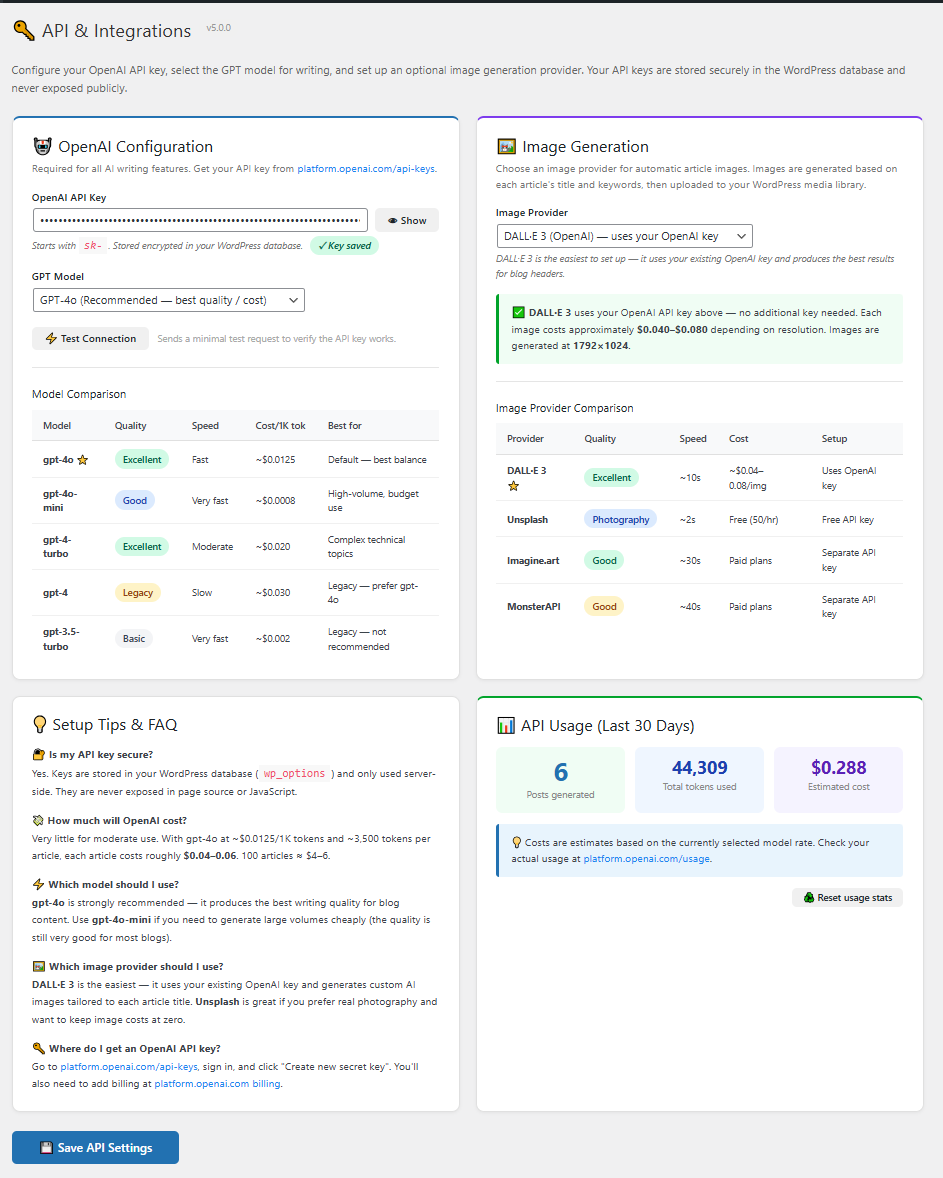
Picking the right model
| Model | Cost / 1K tokens (input/output) | ~Cost per 1,800-word article | Best for |
|---|---|---|---|
| gpt-5.4-mini ⭐ | $0.00075 in / $0.0045 out | $0.012–$0.018 | Recommended default — best quality / cost |
| gpt-5.4-nano | $0.00020 in / $0.00125 out | $0.003–$0.005 | Bulk publishing, max savings |
| gpt-5.4 | $0.0025 in / $0.015 out | $0.04–$0.06 | Premium quality, deeper topics |
| gpt-5.5 | $0.005 in / $0.030 out | $0.08–$0.12 | Flagship pieces — highest quality |
Start with gpt-5.4-mini. It hits the sweet spot for blog content. Upgrade to gpt-5.4 or gpt-5.5 for evergreen flagship pieces or technically demanding niches (medical, legal, finance). Drop to gpt-5.4-nano when running high-volume campaigns where cost matters more than polish.
Heads-up: OpenAI retired the legacy gpt-4o, gpt-4o-mini, gpt-4-turbo, gpt-4, and gpt-3.5-turbo models from the API in early 2026. MrNiche Autoblogger v5.2.0+ auto-migrates any saved selection of those IDs to the closest current replacement on plugin upgrade — no action needed.
Cost tracking inside MrNiche Autoblogger
The Dashboard shows running cost estimates per model based on your token usage (using the live MODEL_COSTS lookup, not a flat rate). Click Reset usage stats in API Settings to zero the counters at the start of a new month or campaign.
Choosing your text provider — OpenAI or Claude (beta)
Since v6.4 the plugin can write with Anthropic Claude instead of OpenAI. Set API & Integrations → Text Provider to Anthropic, paste a Claude API key, and pick a model (Claude Sonnet 5 is the balanced default; Haiku 4.5 is the budget option; Opus 4.8 is the flagship). One switch routes the entire pipeline — drafting, humanizing, titles, FAQ — through the chosen provider. Note: the humanization pipeline was tuned on GPT output first, so treat Claude as a beta and compare the Humanity Reports on a few test drafts before committing a whole site to it.
Daily Spend Cap
Set a daily USD budget under API & Integrations → Daily Spend Cap (0 = no cap). The plugin estimates the cost of every AI call — including OpenAI image generation — and pauses the queue when today’s estimate hits your cap. It’s a soft cap by design: an article that’s mid-generation finishes cleanly instead of publishing half-written, and paused items resume automatically after midnight. The API page shows “Spent today” so you always know where you stand.
Picking the image model
With OpenAI selected as image provider you can choose the model: gpt-image-1-mini (~$0.02/image, great for volume), gpt-image-1 (~$0.07, the quality default), or gpt-image-2 (~$0.10, sharpest). All are billed on your own OpenAI key and saved straight into your media library.
Next steps
- 🚀 Generate your first article
- 🤖 Set up AutoPilot for scheduled publishing
- 🛠 Hitting rate limits? See Troubleshooting
Stuck on the OpenAI side?
We can’t fix OpenAI account/billing issues directly, but we’ll point you at the right docs and verify your MrNiche Autoblogger config.